How I 3X'd my content output as a service-based business owner
A content system is a repeatable process that moves a content idea from research through scripting, filming, editing, publishing, and repurposing, with defined process at every step. The main goal of a content system is to help a business owner (or marketing team) consistently generate high quality content for the purposes of promoting the business. It can be built on a variety of softwares and with a variety of structures based on the specifics of the business. In this article, we’re going to talk about my content system as a service-based business owner.
When you’re a business owner, there’s one thing that’s pretty much always on your mind: “how am I going to find more clients?” When I started Exhale, it was not my first business (if you want to hear more about my prior business, I share that story here). So I thought carefully on how I wanted to build my strategy for getting in front of new people more consistently and how I wanted to tell a compelling story about why my services were worth choosing.
But then comes the reality of making it happen. I had ideas sitting in a Notion database. I had inspiration for formats in my Instagram saves. I had a tripod and a decent phone camera. But content still felt hard and often fell lower on the to do list as I prioritized a client project first.
I know I’m not the only one who has struggled to promote their business. It feels icky sometimes. It requires a whole different set of skills than the thing that your clients pay you for and it takes time.
But as a operations and systems expert, I knew there had to be a way to do it that didn’t feel so painful. Which is why, a few months ago, I started building, tweaking and refining my content system and I want to share what I’ve built, how it’s helped my business, and what I’ve learned along the way.
A content system for small business owners: how I post more content to promote my business
Why creating content feels hard
Let’s start with acknowledging the reality here - if creating a ton of high quality content that increases visibility and converts client was easy, everybody would do it. When it’s described by an Instagram guru, they make it sound easy (usually to sell you on their course). But the reality is, this can be the biggest game changer for your business because most people never figure it out. So let’s talk about the problems that often get in the way of business owners having a consistent content system…
Plenty of ideas, no execution
If you’re like me, you’ve probably got dozens saved video ideas and formats across your Instagram saves, screenshots, a random note in your phone and in your task manager. But that’s a big difference than actually converting all those ideas into videos and images that get posted on your company pages.
There’s plenty of inspiration out there. But as the business owner you have to sort through what applies to your business, what wins vanity metrics like a view versus a client inquiry, and figure out how to adapt inspiration to work for your business. This isn’t just common sense, it relies on a combo of sales psychology, clear positioning, copywriting and creativity. And that’s all just in figuring out the ideas for a post.
It’s super common to get stuck and never actually execute.
No organization means low follow through
Sometimes motivation comes in waves. You feel good, you prop the camera up and film a couple videos and for a few days you have things to post. But then a week will go by with a big client project, so nothing goes out.
Consistently creating content usually requires having recurring habits that make sure each stage of the process gets done enough to continue to fill the pipeline. If you’re trying to remember how to do this all in your head, it’s an uphill battle. For a while, this is how I was doing this.
My first fix was to build a Notion dashboard with the various stages of the process, so I could at least track where any single piece of content stood. But things didn’t always get into the Notion, and the a random note jotted down from when I was on the plane didn’t usually help when it was time to sit down and script.
Good quality takes a ton of time
I’d save videos of other business owners whose content was polished, with slick graphics and a distinct point of view. But when I tried to replicate it, that editing would take me 2 hours for a one minute video and still not look as good. Apply this to my YouTube process and I could easily spend 26+ hours on a single video, pulling time from my weekend and other priorities in the business as I tried to put chips in the slot machine of growing my marketing visibility.
There is always a gap for business owners of the quality you want to achieve in your content and where you are starting out. And this is usually a painful wakeup call of how much harder this content thing is than you realized.
not enough time to create content
But on the flip side, creating content is just one of many, many to do list items for a business owner. Multiple this problem x100 if you run a service-based business where your “product” is really your time, which needs to be billed to clients to grow the business. Content is important but it can’t become a full time job for a business owner who has other things to do.
the algorithms want more
And in between the tug of the rest of the business and the quality you want for the content, the platforms where we go to connect with potential clients (Instagram, TikTok, YouTube, Pinterest), reward quantity. And quality, yes, but there is an expectation of a consistent volume flowing through their platforms otherwise somehow the reach drops.
I lived this in my last business, posting 8-10x per week for months on end and ultimately growing my business to six figures in revenue and followers within ~18 months. The content slog was real, posting over and over again but the growth curve had these exponential jumps where after months of seemingly nothing, big growth would land overnight.
What options exist to help business owners create more content
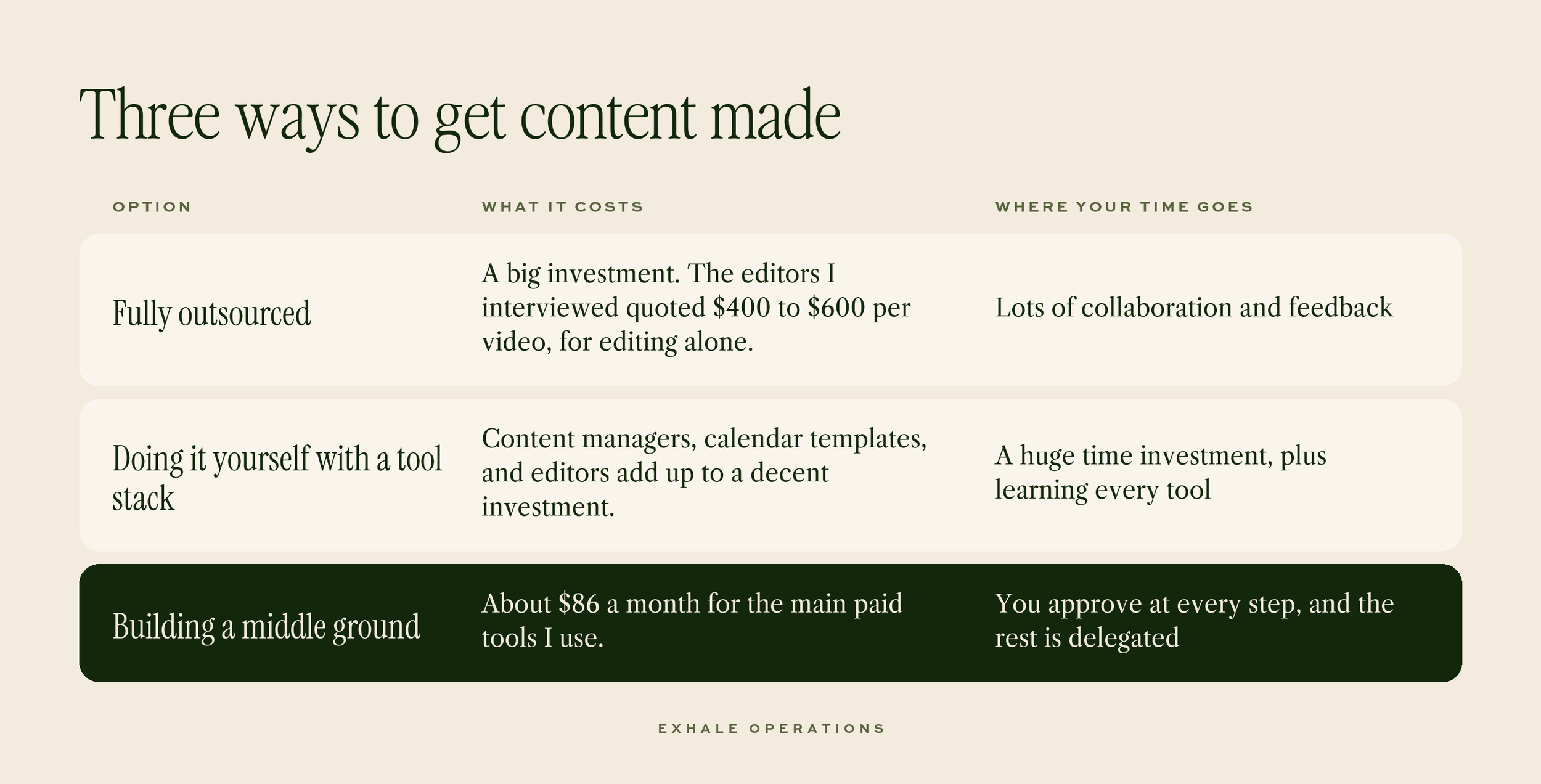
With so many things on my plate, as with any business owner, there are only a few paths forward, if you want to make the content thing happen (there’s also the option to just give up and accept that you can’t do it, but we’re not quitters here) and they vary dramatically in how much they cost and how much time they really save.
Everything about this decision would’ve felt different before 2025, but in the last few years, the explosion of automation rules and AI-powered tools, including LLMs have opened up huge new opportunities for more nimble strategies to support business owners, especially who don’t want to hire a big team.
But that still meant I had to build something that actually solved the problems I was facing.
What I built: three engines and one flow
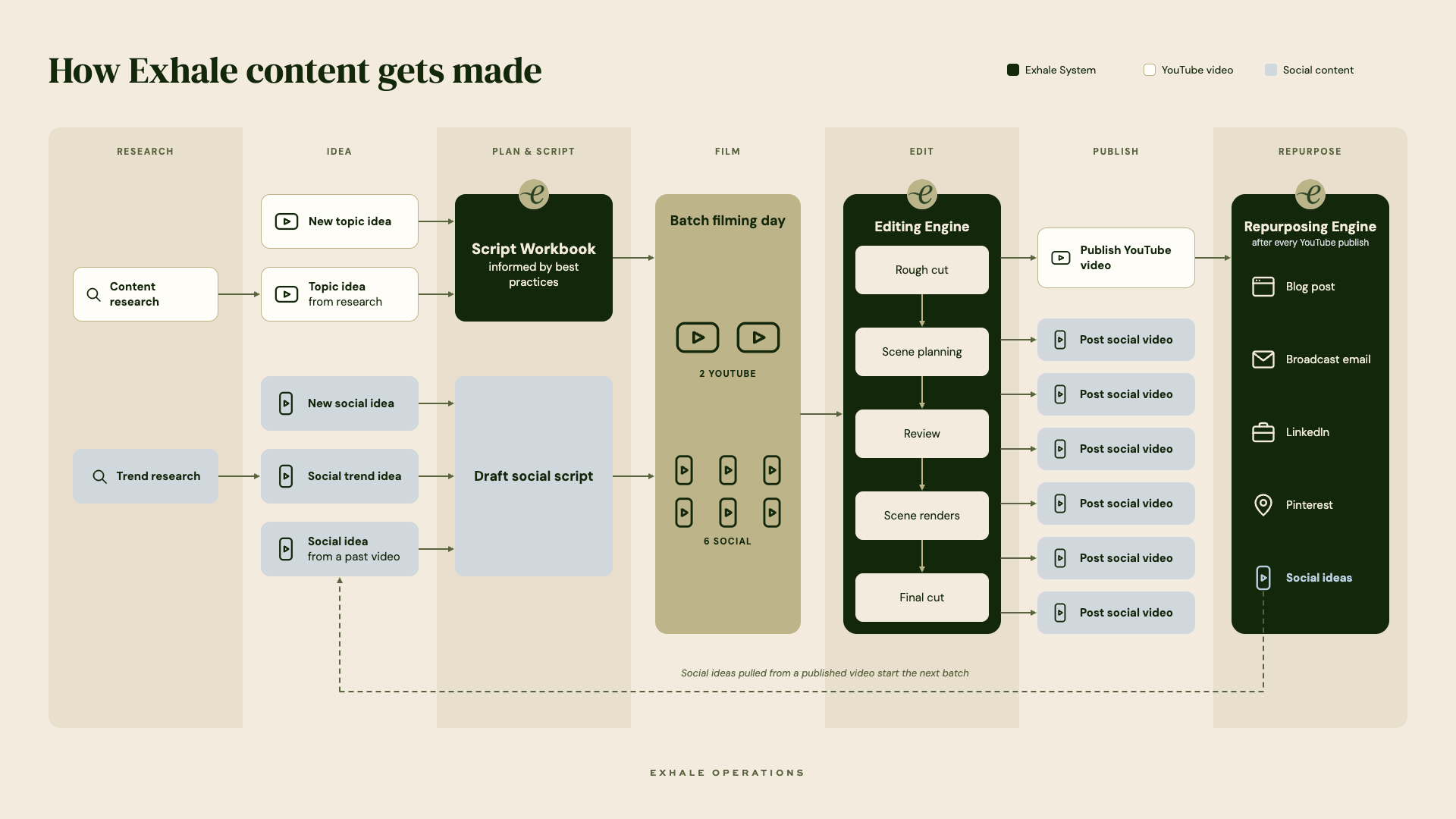
Here's the way I think about my whole content process, from research to repurposing.
As I was sitting down to design my content system, the steps of the process were always the same:
I needed ideas, whether they came from a video I saw, something I read or a keyword that had high search volume. Sometimes there was research required, or something that needed to be captured
For any video with talking, either a talking head social video, a full YouTube or a well edited social montage with a true voiceover, I had to draft out a script
Then each video had to be filmed, edited and published
And certain longer form content, like YouTube, could be used to spawn off other formats, if they were transformed correctly
As I was planning, I realized that there were a few huge bottlenecks in the process: scripting, editing and repurposing all could take hours if I worked through them manually. So these were the biggest opportunities for times saved, if I could build tools that accelerated any of those processes.
But before I break down each of the three major engines I built, let’s talk briefly through the whole process.
Research and ideas
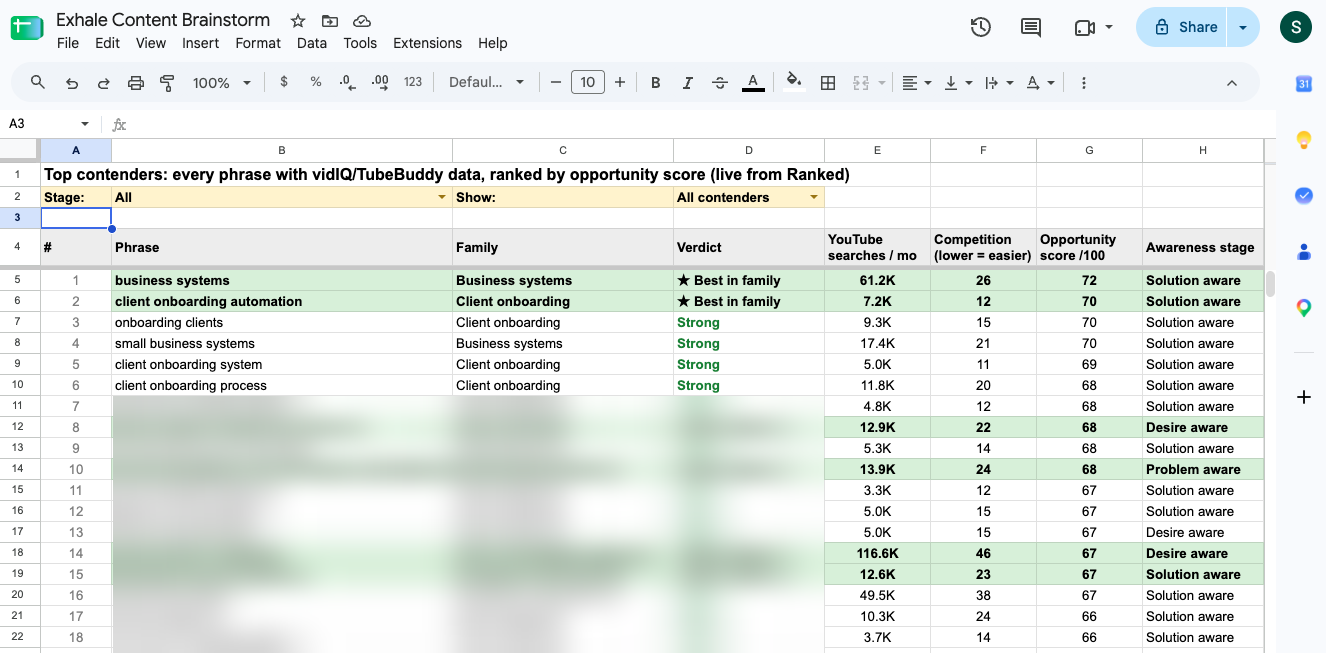
For research, I use Google Keyword Planner for general search keywords, and vidIQ and 1of10 for YouTube-specific ones. Claude helps me pull all of it into a Google Sheet, which holds a running list of keywords I already know, each scored by the opportunity attached to it. I refresh it about once a month, and it takes about an hour. YouTube topic ideas come out of that research.
Social ideas come from three places: trend research, new ideas, and points from my past videos. I'm always collecting ideas from trends and new ways to frame things, so that part happens in small moments throughout the week.
Scripting
Once I had an idea for a video, whether on social or YouTube, it still took focus to figure out what exactly I wanted to say. Even if I could jot down points, I lived with this awareness that there were so many best practices I was missing to make my content more valuable and engaging.
For YouTube videos especially, the longer format could take me upwards of an hour to write out even a mediocre script and if I started to edit it toward best practices, I’d end up rewriting completely. So for this, I developed my Script Workbook.
The Script Workbook is an artifact in my Claude that walks me through the process of fleshing out an idea into a full script. It’s got a predefined structure based on the best practices I've found for YouTube videos that work. It walks me through validating an idea, then packaging it (the title, the thumbnail, and the promise of the video), then outlining it, and then writing out what I'll say in the intro and in each main point.
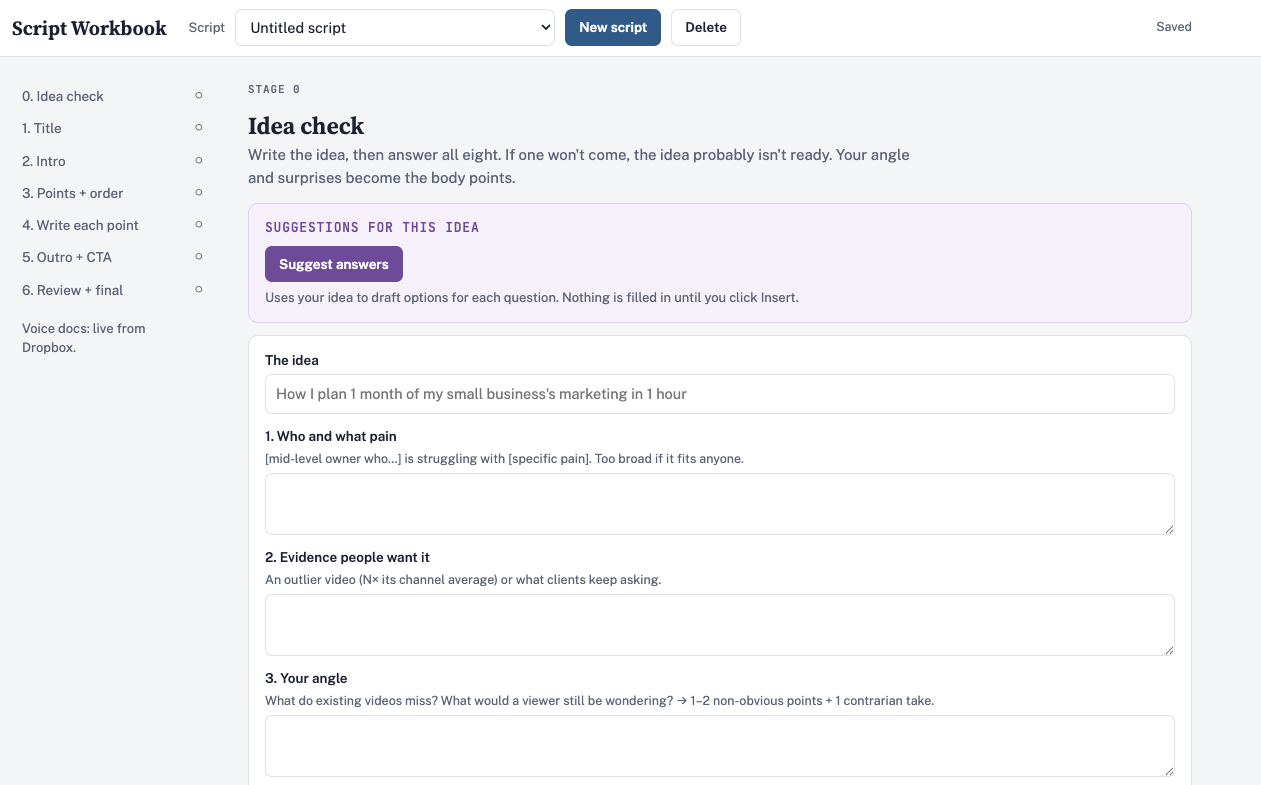
Throughout, it reminds me of moments to insert curiosity to keep the viewer engaged or provides prompts to help frame my thoughts.
Once I finish writing a script, it reviews the draft and scores it based on all the best practices, providing suggestions on where to tweak, all in the same interface. For example, it challenges me if the body of the YouTube script hasn’t actually delivered on the promise I made in the intro, so I don't open a loop and never close it.
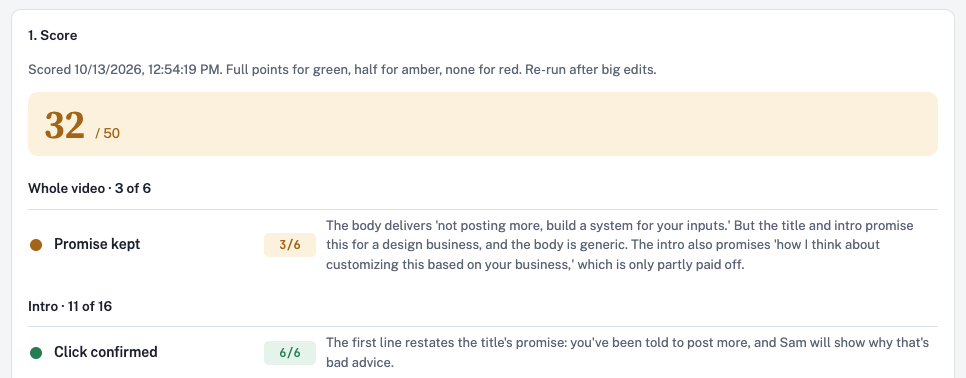
What comes out is a script that's ready to film, but more importantly, really strong. I’ll be honest, at this point, the value to this is more quality than speed, because it’s still a focused and sometimes lengthy process, but if I’m going to spend all this time creating for YouTube, I want it to be worth it. I’m excited to continue refining this and eventually I’d love to build one for social too.
In the meantime, scripting for social is a bit more manual but I have a structure for any talking videos that I try to follow and I maintain a big reference document of great hook formats or positioning ideas to help keep things interesting.
Filming
Even after years of filming myself to post on social media, it still takes psyching myself up to film. Rather than setting up the camera and putting on the bare minimum makeup regularly, I’ve found that it’s far easier to designate a filming day and try to get a big batch done all at once, giving me room to edit and post the batch over time.
This all depends on the earlier steps having been completed. A batch filming day with no scripts is a waste of time. But if I can get scripts written for a bunch of social videos and at least one YouTube, a focused hour or two can yield the raw footage I need to last me over a week.
I just record on my iPhone using a tripod and recently have added in a microphone, but candidly, don’t think the microphone is required for most people, as long as you’re recording in a quiet space with good lighting.
Editing
When you start creating video content at scale, you have tons of raw footage and it has to somehow get prepared to actually be a postable video. Editing is the refining process that takes a simple clip into something engaging to watch. After my first 36+ hour stretch of trying to edit a YouTube video and having the output still only be okay, I was frustrated. I went on to test work with both a beginner editor and a premium editor because I knew spending that amount of time editing was never going to be sustainable while I had real paying clients who needed my attention.
It felt like there were only three options to navigate this process…
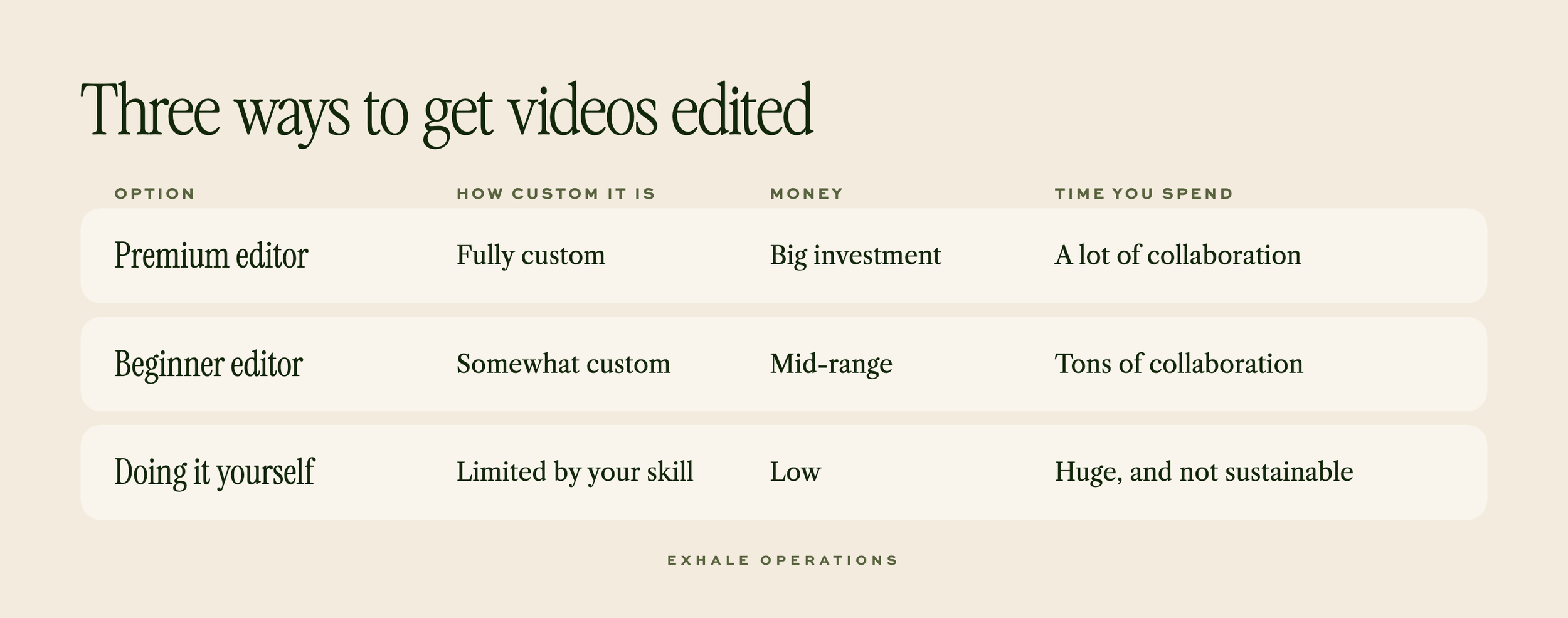
But the purported benefits of working with editors weren’t what they were cracked up to be. Yes, I wasn’t spending the time editing myself, but I still had to write directions to communicate my vision and provide multiple rounds of feedback. And there was the investment.
This frustration, and some well timed innovation in the AI space, pushed me to build a strategy for editing on my own, powered by Claude. Once it was built, I had found a balance - a DIY option in terms of cost, for around the same amount of time invested when I was giving feedback to editors. The editor was just an AI tool instead of a person.
The Editing Engine
As someone who posts content both professionally and personally, it was important to me that this engine wasn’t built inherently for one brand. There are tools and systems that apply to anybody editing a piece of content, whether your brand is sophisticated or playful, irreverent or serious. By pulling the Brand studio out separately, the engine has been built from the start so that if I wanted to edit a piece of content for a client or maybe eventually share this engine with you, the preferences, footage, b-roll, fonts, colors and everything else specific to a brand could be swapped in.
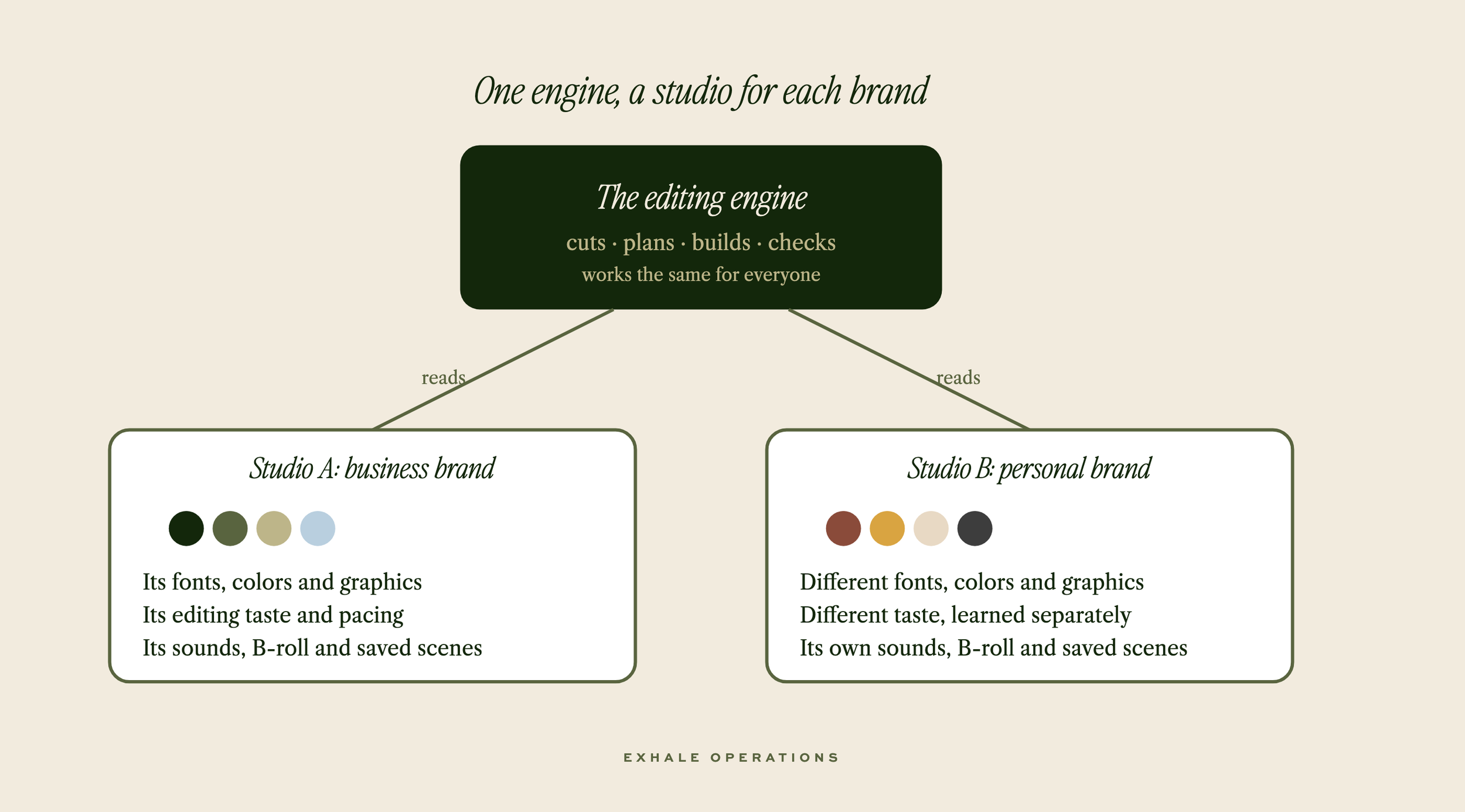
But the real benefit to the engine comes in the process. This tool has taken the process of editing a YouTube video from 28-36 hours down to 4-6. I'll dive even further into it in an upcoming post but here are the basics.
Rough Cut -
the engine takes raw footage from your filming, generates a transcription and is able to cut out all pauses, retakes, flubs etc. generating one clean cut of the video for you to work with. It builds the video inside Capcut so if I want to delete a take or trim clips for clean sound, I don’t have to have it generate a totally fresh video, I just go in manually and tweak
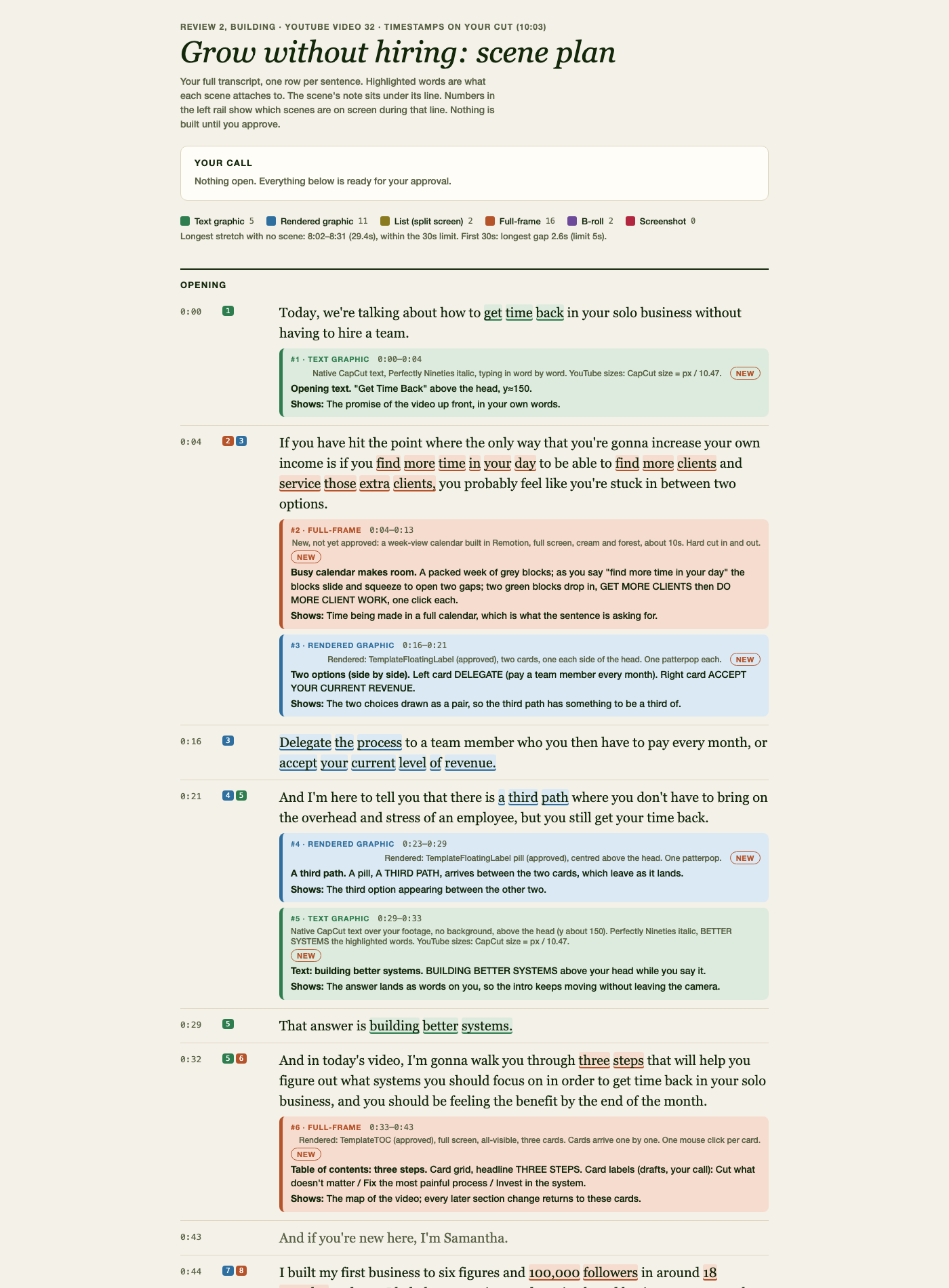
Scene Plan -
Using technology to help with edits comes with the enormous risk that your videos end up looking like everybody else or the edits that get added in make no sense.
Everybody’s had a discussion or thirteen about the “AI Slop” so I was determined to make sure that anything I had edited via Claude actually showed what I wanted in the editing process.
So I built a scene planning tool, so before a quantity of tokens was deployed generating animations that I’d never approve, I had the opportunity to give feedback and refine. This process is one of the two most time consuming parts of the whole thing because it’s where I’m communicating my vision, but it’s also the best time spent.
I’m continually impressed with how the engine can take my direction and come up with accurate premium graphics. And over time, I’ve developed a repository of saved scenes and templates that make prompting for scene plans that much easier.
This is the part of the process that’s taken the longest to feel ready to share with everybody else. It’s everything from “what deserves an animation vs. just a text graphic?” “how do the philosophies for editing vary between social videos and YouTube?” to “what’s the best practice for where captions sit on screen?”
By spending the time upfront to plan this right, the following rounds of editing on the videos are substantially faster.
First Cut and Review -
Once the scene plan’s approved, Claude generates all graphics and plugs the into the same Capcut project, with my approved sound effects and visuals.
I’m able to watch through and in the chat interface with Claude, give feedback based on animation number or time stamp on what to change adjust or add. Then I have it work on those edits while I do other things.
Second (and more as needed) Cut and Review -
Then I repeat this process as many times as needed until I’m happy with the video. On social videos it’s rare that I have to give a third round of feedback, for YouTube videos, just because of the amount of footage and moments for scenes to be added it can occasionally take more.
But each round of edits from Claude takes a few minutes, max 10.
Wrap Up -
Once I’m happy with a video, I export it to save in my folders and tell Claude to wrap the video. It gets rid of any mockups or behind the scenes files that would clog up my computer memory and marks the project complete for itself.
But the most important part of the wrap up is the learning. Claude reviews all the feedback I gave and scenes we created and gives me a multiple-choice review screen to look at every visual or category of change and decide whether it was a one-off situation or if it’s a rule I want to implement moving forward.
Because of this process, my videos have gotten better and required less and less editing over time.
Publish
With my fully edited videos saved in my folders, I can spend under an hour, in one sitting, uploading, drafting captions and scheduling my content to go out across platforms, using my social media scheduler (Metricool) or the native scheduling tools. I’m working to build a caption assistant too to help streamline the process.
Repurpose
But why create one piece of content when I could create five? I knew that the YouTube scripts I poured over had value in a written format (and serious SEO benefit) but it didn’t make sense to spend hours drafting a unique post on the same topic. So I built a third system to make sure that I was getting the most value out of every content idea I had.
The Repurposing Engine
After I publish every YouTube video, I trigger my Repurposing Engine which pulls the transcript of my video and begins passing it through a series of skills trained on the best practices of different platforms to reformat the idea from the video for uses elsewhere.
The transcript is formatted it into an SEO friendly written blog post, an email that I can use to promote the video, LinkedIn and social ideas based on the points I made in the video, and can even draft descriptions and designs for pins promoting the blog that can be automatically scheduled directly through my Claude.
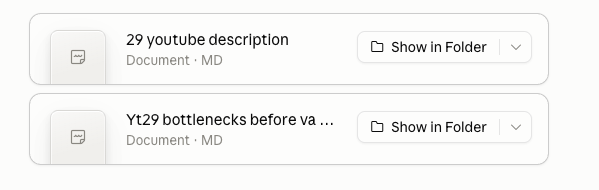
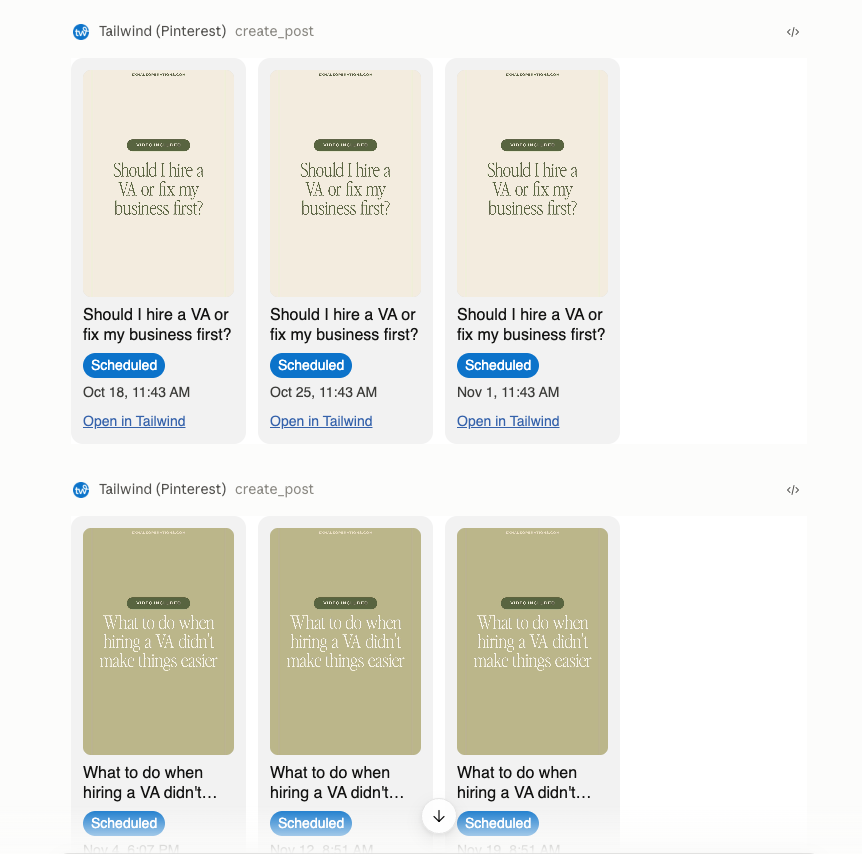
Just like scripting, every piece of content is reviewed and I still probably rewrite 10-20% of each blog post and email. But because of a similar “wrap up” skill to the end of editing, the writing in my posts has gotten better and less AI-sounding over time such that I can usually review and publish the blog within 30 minutes.
The time spent on drafting a YouTube video is more valuable when I can also get 3 social videos out of it, which then get filmed in the following week’s batch.
The tools (and cost) of my content system
Okay, but what does it actually take to make it work and does it save money?
Here's what I use and what I pay for each, as of October 2026:
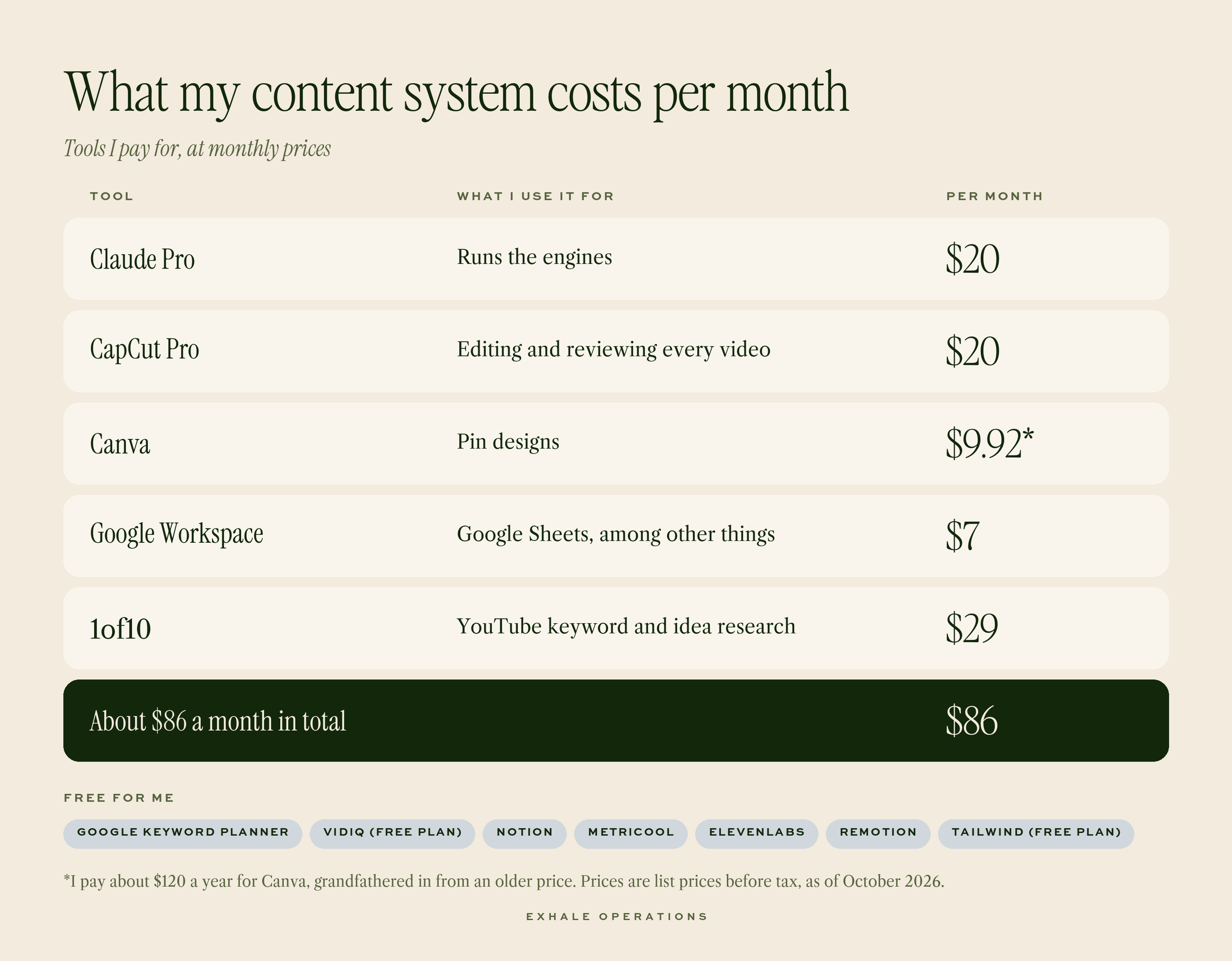
Tools mentioned (pricing may not be accurate): Claude (Paid); CapCut (Paid); Canva (Paid); Google Workspace (Paid); Google Keyword Planner (Free); vidIQ (Free); 1of10 (Paid); Notion (Free); Metricool (Free); ElevenLabs (Free); Remotion (Free); Tailwind (Free) - many of these, if used in higher volumes require paid plans but at the output of a solopreneur can be used in reasonable quantities to stay on the free plan
By building my own tools on top of my existing subscription, mainly via Claude, I’ve been able to put together a powerful, customizable and constantly evolving system for 10x less than hiring someone. As a result, I am constantly learning and evolving my own skill level from still being in the weeds of this process, but able to do it in significantly less time.
Has there been a trade of my time to build this all rather than completely out of the box, yes, absolutely! But as an ops/systems girlie, this is some of my favorite type of thinking/work to do and I’ve legitimately enjoyed it. And the good news is, this doesn’t have to be the reality for everybody else, because…
I’m working on packaging these tools to be able to share them with you!
I’ve learned so much about building skills and plugins that I think these tools are almost ready to be implemented in other businesses. But to make sure that they are easy to use, with all the requisite set up instructions, I need a bit more time to finalize. If you would like to know when they are ready to access, drop your info here and you’ll get the early bird notice and pricing (especially as I work through the early kinks of sharing this type of resource., I’m planning on making them very affordable)!
What changed when I implemented these systems
My goal was twofold - create quality content more consistently without spending more time on it.
I’ve stayed consistent with my one YouTube video per week, before and after these engines. But before, each video would take me .5-1 hour of research, 1-3 hours of scripting, 1 hour of filming, 28-36 hours of editing and 1 hour of the final publishing checklist (thumbnail, description, scheduling etc.). That 30.5-41 hours per video is now down to .5 hours research, 1-2 hours scripting, 4-6 hours editing, .5 hour of publishing, totaling 6-9 total hours per video. 5x faster, not to mention all the time saved in the repurposed outputs.
Social videos were faster to make but because of the thinking and disorganization, I’d get 2-3 max out per week, usually 1-2x. Now, I can regularly get 5-7 high quality social posts out per week.
And then with repurposing, I’m posting to my website (earning SEO credibility and search traffic), keeping my email list active, and feeding the social engine all within the same process.
I’m still in the early stages on seeing the impact this will have on my growth in terms of followers and clients, but my views are consistently growing, at least 50% each week as I continue to refine this engine.
But at the beginning of this post, and just now, I mentioned that the goal wasn’t just more. The more powerful part of this system is the time it’s given me back. Because each of these steps has made me more efficient at content, I’ve had time to invest in networking, in behind-the-scenes projects for my business, even in preparing the engines to be ready to share with you. And I didn’t have to trade thousands of dollars on an ongoing basis to get the time back like I would’ve if I’d outsourced my editing and content marketing.
The biggest change for me is that I'm no longer thinking about content every two or three days. When a batch is done, the next week's workdays go to my clients and the rest of my business.
If you want that for your own content, drop your name on the waitlist here and I’ll let you know as soon as it’s ready for outside use.
Frequently asked questions
How do I create more content as a solo business owner?
The most effective change is to stop treating each piece of content as its own project and run all of it through one repeatable process. For me, that meant a defined structure for research, scripting, filming, editing, publishing, and repurposing, and then batching the filming and editing. A batch day of 2 to 3 hours gets me at least 1 YouTube video and 5 social videos, and I do it in one week to cover two. That's how I went from 1 to 2 posts a week to 1 YouTube video plus 5 to 6 social videos.
Can AI write my video scripts?
Not in my setup. I write every script by hand, and the Script Workbook structures the process and checks my work. It walks me through validating the idea, packaging it, outlining it, and writing each part, then scores the script and challenges me if I haven't delivered on the promise I made in the intro. It doesn't save me much time yet, but my scripts are substantially stronger.
How much does it cost to build a content system with AI?
The main paid tools I use come to about $57 a month: Claude Pro, CapCut Pro, Canva, and Google Workspace. Notion, Metricool, ElevenLabs, Google Keyword Planner, and Pinterest are free for me, and my YouTube keyword tools (vidIQ and 1of10) are extra. For comparison, the video editors I interviewed quoted $400 to $600 per video for editing alone. Prices vary by plan and region, so check each tool before you budget.
How do I turn one YouTube video into more content?
Start from the video's transcript. My Repurposing Engine drafts a blog post, suggests an email to promote it, and gives me LinkedIn and social ideas from the points in the video. An optional step packages the concept into Pinterest pins with titles and descriptions. The points from the video also become social videos for the next batch, which I use to promote the video or any freebie it mentioned.
How long does batch filming take?
A batch filming day takes me 2 to 3 hours, whether I'm filming 1 YouTube video and 5 social videos or as many as 3 YouTube videos and 8 social videos. The editing happens after, in batches too, and a YouTube video takes me 4 to 6 hours to edit. If you'd like to see the full setup for your own content, [join the waitlist](WAITLIST LINK).
SUGGESTED READING
How to save 5+ hours a week in your solo business (without putting someone on payroll)
How to use AI for small business marketing in 2026 (actually drive leads)