After my first 36+ hour stretch of trying to edit a YouTube video, I watched the export back and it was only okay. Not bad, not great, just okay, and it had eaten most of my weekend.
A video editing engine is a setup that takes raw footage and turns it into a finished, on-brand edit, while you approve each stage along the way. Mine runs on Claude and CapCut, and it took my YouTube editing from 28 to 36 hours per video down to 4 to 6.
I recently shared my whole content system, from research and scripting through publishing and repurposing. Editing was the step that made the biggest difference, and it's the one I promised to break down in more detail. So this post is the full tour.
If you've ever saved a video from another business owner with slick graphics and a clear point of view, then spent two hours trying to recreate one minute of it, this is for you. I'll walk through why editing was the bottleneck, what I tried first, how the engine works from raw footage to export, and what's changed since I started using it.
AI video editing for small business owners: how I edit a YouTube video in 4 to 6 hours
Why editing was the biggest bottleneck in my content
When you start creating video content at any kind of volume, you end up with tons of raw footage, and all of it has to somehow become a postable video. Editing is the refining process that turns a simple clip into something people want to keep watching.
I'd save videos of other business owners whose content was polished, with graphics that made their point land and a distinct style that was recognizably theirs. But when I tried to replicate it, the editing would take me 1-2 hours for a one minute video and still not look as good.
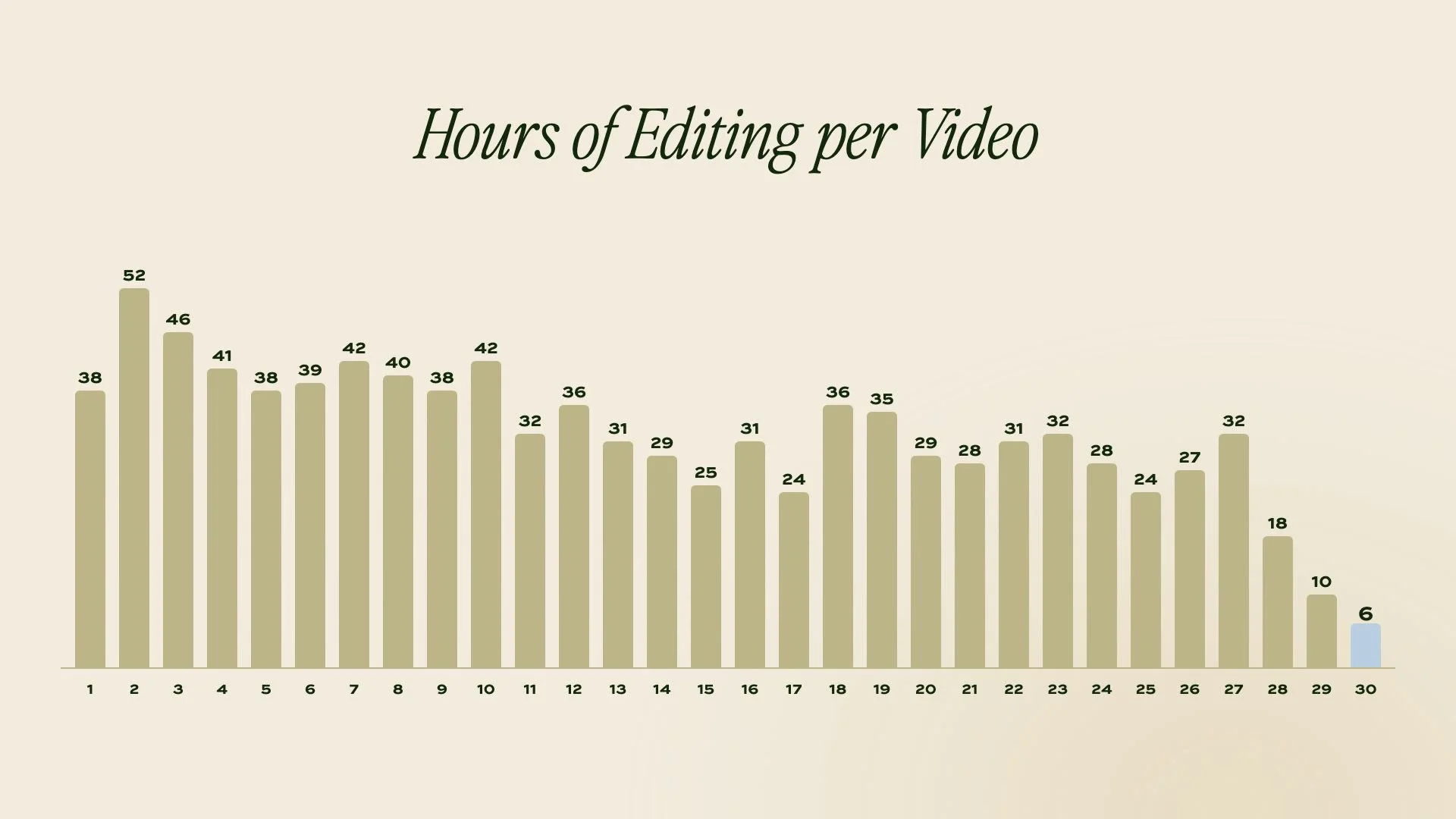
YouTube was worse. I tracked my hours on every video, from the moment I uploaded raw footage to the moment I uploaded the final version. My first ten videos averaged 41.6 hours of editing each, and one took 52. That was time pulled from my weekends and from client work, and the result was still an edit I'd call subpar, because editing is its own skill and I was still learning it.
And the platforms don't care how long it took you. Instagram, TikTok, and YouTube reward quality, yes, but they also expect consistent volume. I lived this in my last business, posting 8 to 10 times a week for months, and the growth came in big jumps after long stretches of what felt like nothing. You can't get to those jumps if every video costs you a work week.
So I had the classic business owner problem: I wanted content that looked professional, and I wanted a lot of it, and I had real paying clients who needed my attention more than my timeline did.
The three options I tested before building my own
Before I built anything, I looked at what was out there.
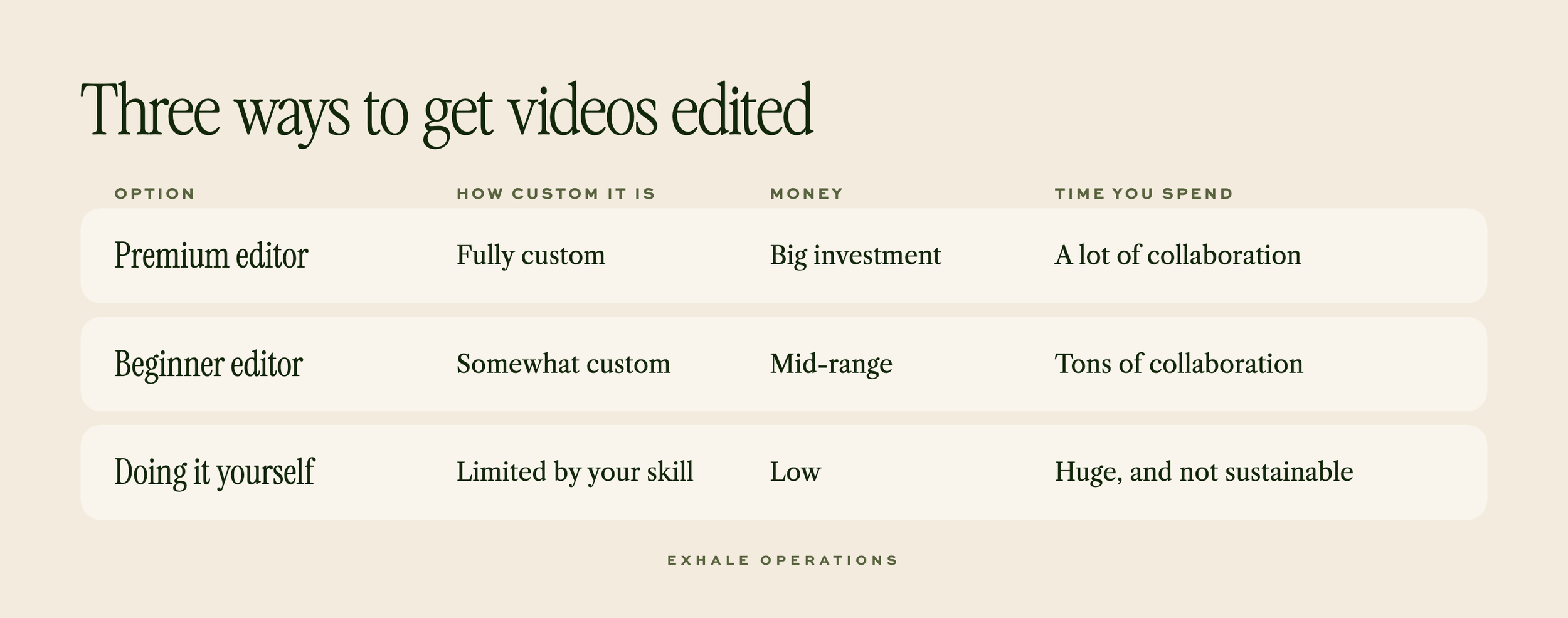
I interviewed three editors with quotes ranging from $200 to $600 per video (after a first video promotional pricing), which works out to roughly $800 to $2,600 a month for one YouTube video a week. At the time, I was desperate to get the 25+ hour editing sessions off my plate, so I ended up doing tests with both a beginner and experienced content editor to try things out.
But the benefits of working with either editor weren't what they were cracked up to be. Yes, I wasn't spending the time editing myself, but I still had to write directions to communicate my vision and give multiple rounds of feedback, regardless of experience level. Yes, I saved a good chunk of time but I was looking at a big investment, beyond my budget, if I committed to that every week.
That frustration, plus some well-timed progress in AI tools, pushed me to build a way to edit on my own, powered by Claude. Once it was built, I'd found my balance: DIY in terms of cost, for about the same amount of time I used to spend giving feedback to editors. The editor is just an AI tool instead of a person.
The Video Editing Engine: one engine, a studio for every brand
As someone who posts content for my business and as a hobby, it was important to me that the system I built was flexible enough to sub brands in and out. There are tools and steps that apply to anybody editing a talking-head video, whether your brand is sophisticated or playful, irreverent or serious. And then there's everything that makes your videos look like yours - I needed to make sure that flexibility was preserved in my system.
So I split those apart. The engine is the part that does the editing. The studio is a separate folder that holds everything specific to a brand: fonts, colors, graphic style, B-roll, sound effects, saved scenes, and my editing preferences (how tight the pacing is, which sounds I like, what earns an animation versus a simple text graphic).
The engine reads from the studio every time it works. If I want to edit a video for my personal channel, I point it at a different studio and get a different look, with its own preferences. And if I ever edit for a client, or share this engine with you, the same thing applies. Your brand gets swapped in.
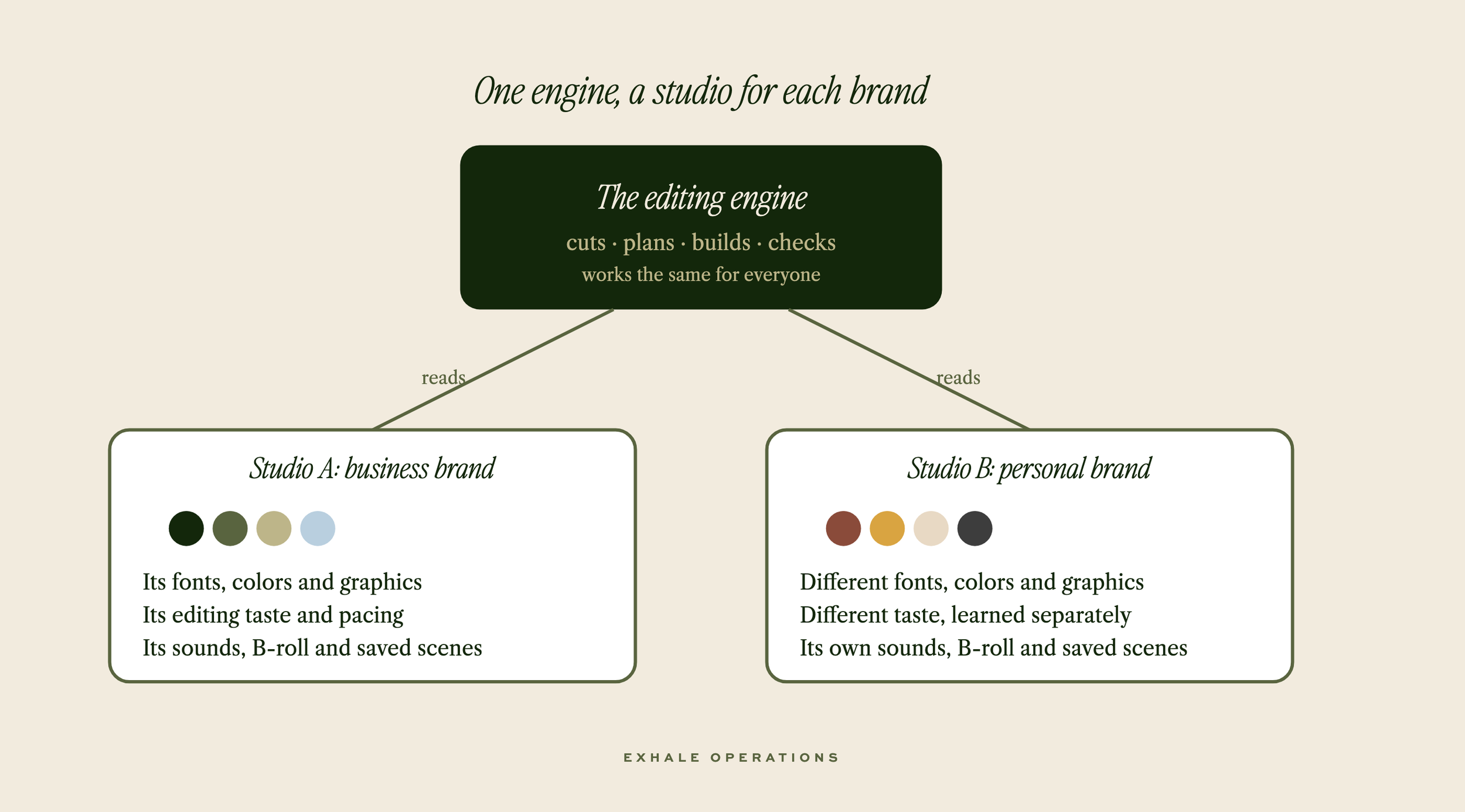
The studio is the part I care about most. I get editing that's more sophisticated than I have the time or skill to do myself, and I also get to build up my brand's own editing style over time instead of borrowing someone else's template.
A few other choices shaped how it works day to day:
I stay in control at every stage. Nothing moves forward until I've approved the step before it, so I never end up giving three rounds of notes on a finished cut that went the wrong direction from the start.
It works inside a tool I already use. The edit is a normal CapCut project I can open and change by hand at any point.
I talk to it in plain language. I give feedback the way I would to an editor, by timestamp or scene number, and I never type a command.
It learns from my edits. Every video ends with a review of what I changed, so the next one needs less of my time.
How a video moves from raw footage to a finished edit
Here's the process for every talking-head video, YouTube or social. I drop the raw footage in a folder for that video, tell Claude which video we're working on, and it starts.
Rough cut
The engine transcribes the raw footage and cuts out the pauses, retakes, flubs, and dead air, which leaves one clean cut of the video to work from. When I restart a sentence three times, it keeps the last take by default, because that's almost always the one I meant.
It builds the cut inside CapCut, so if I want to delete a take or trim a clip for cleaner sound, I don't have to have it generate a totally fresh video. I go in and tweak it by hand. Then it reads my edited version back from the saved project, so everything after this point is timed to my cut, not its first guess.
The results blew me away when I first saw them. The rough cut tool easily took raw footage for two videos down dramatically and accurately, from 22:51 of raw footage to 9:20 in the final cut and 10:14 in raw footage to 6:20 in the final cut, each in about 15-20 minutes of letting the system in Claude work. For social clips the results deliver in minutes, cutting raw footage of 2:30 down to 1:24, 1:46 to 1:14 and 1:29 to 0:54.
Scene plan
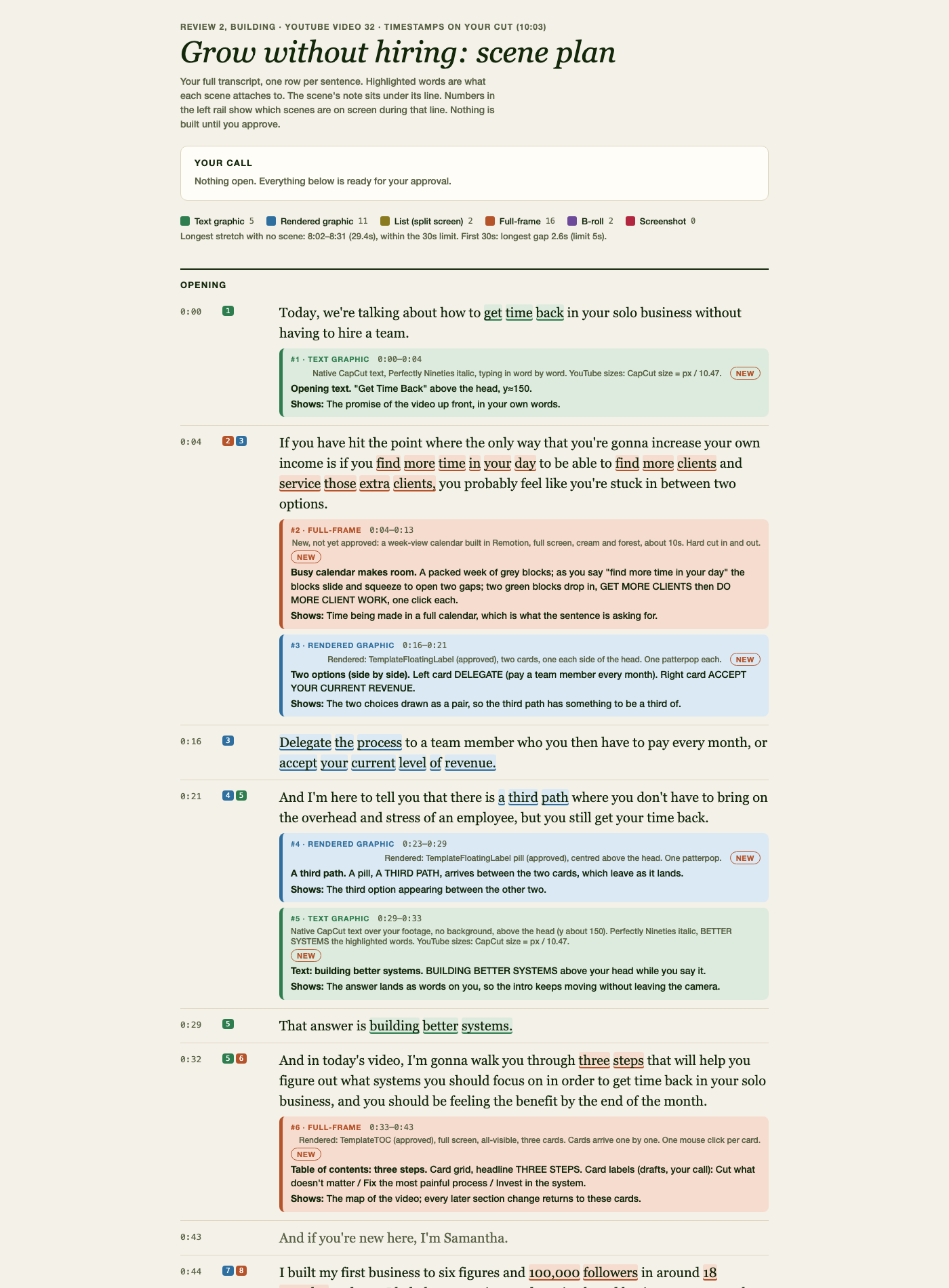
Using AI to help with edits comes with an enormous risk: your videos end up looking like everybody else's, or the edits that get added make no sense. Everybody's come across "AI slop," so I was determined to make sure anything edited through Claude was still quality I’d stand behind.
So I built a scene planning step. Before a pile of tokens gets spent generating animations I'd never approve, Claude makes a plan page with my full transcript, one row per sentence, showing which graphic, B-roll clip, or text goes where. At the bottom there's a short numbered list of questions for me, in plain language. Nothing gets built until I approve it.
This is one of the two most time-consuming parts of the whole process, because it's where I'm communicating my vision. It's also the best time spent. I'm continually impressed with how the engine takes my direction and comes up with accurate, premium-looking graphics, and over time I've built a library of saved scenes and templates that make each new scene plan faster.
This is also the part that's taken the longest to feel ready to share. It covers everything from "what deserves an animation versus just a text graphic?" to "how does the editing philosophy change between social and YouTube?" to "where should captions sit on screen?" Spending the time up front to plan this right is what makes the following rounds of editing so much faster.
First cut and review
Once the scene plan's approved, Claude builds all the graphics and drops them into the same CapCut project, along with my approved sound effects, B-roll, and, for social videos, captions. Text stays as native CapCut text, so I can fix a typo by hand without asking for anything.
Before it hands the project back, it runs a final check for overlapping graphics, uneven sound, and long stretches with nothing new on screen, then tells me which spots need my eyes.
Then I watch it through in CapCut and, in the chat with Claude, give feedback by scene number or timestamp on what to change, adjust, or add. It works on those edits while I do other things.
Second (and more as needed) cut and review
I repeat that loop until I'm happy with the video. On social videos, it's rare that I need a third round of feedback. YouTube videos have so much more footage and so many more moments for scenes that they occasionally take more.
Each round of edits from Claude takes a few minutes, 10 max.
One thing I was nervous about early on was the engine overwriting changes I'd made by hand. So every change to a project I've already opened gets backed up first, and the tools won't run while CapCut is open. My saved CapCut project is always the source of truth.
Wrap up
Once I'm happy with a video, I export it from CapCut, save it to my folders, and tell Claude to wrap the video. It clears out the mockups and behind-the-scenes files that would otherwise clog up my computer, and marks the project complete.
But the most important part of the wrap up is the learning, so it gets its own section.
How the engine gets better with every video
At the wrap up, Claude compares my finished project to the last version it built and logs every change I made by hand. Then it gives me a multiple-choice review screen, with stills of each visual or category of change, and I decide whether it was a one-off situation or a rule I want to keep moving forward.
Most of my fixes are one-offs: a graphic that needed to come in a beat later on that specific line. But some of them are patterns. For example, I kept shortening the pauses it left between sentences, video after video. Now it leaves shorter pauses by default, and that's one less thing I fix by hand on every single video.
Anything I state outright ("never put a photo collage in the opener unless I ask") skips straight to a rule.
Because of this process, my videos have gotten better and needed less and less editing over time. I'll be honest, this part is still a work in progress, but it's improving with every video, and it's the reason the engine feels like it's building my style instead of borrowing one.
What it runs on (and what it can't do yet)
Here's what's under the hood:
Claude (Desktop), through Claude Code, the version that works with files on my computer, does the planning and the building.
CapCut (Desktop) is where the editing lives and where I review everything.
ElevenLabs transcribes the footage.
Remotion draws the animated graphics CapCut can't make on its own, like charts, lists, and cards.
ffmpeg, a free tool, handles the video files behind the scenes.
Each video gets its own folder with the raw footage, working files, scene plan, and final export. Each brand gets its studio folder.
It sounds nice and clean describing it here, but there is some technical setup to it. In order to get it all set up, you need to be comfortable starting an ElevenLabs account (but it’s free!) and pulling an API key. I was able to walk myself through this with some clear instructions (and if you get the setup from me, I’ll obviously give you the step-by-step) but it’s not just plug and play.
There are also a few limitations in what the system can do on its own:
It technically can't watch the video. This doesn’t bother me because I visually verify everything looks the way it should. The output is pretty great, honestly, for it doing it all through code on the backend.
A few moves are still manual. Claude and CapCut don’t play well when it comes to partial opacity like fade outs or partially transparent visuals. There may be a way around this and if there is, I’m going to find it, but for now there are certain things that I have to add on to the Capcut edit manually.
It's best for talking-head videos. I’ve gotten it to do some montage or B-roll based videos but it’s still learning. More vlog style content is harder for the system to comprehend so I haven’t done a ton of testing on it.
My honest thoughts though? Even if it saves me 50% of my editing time for a fraction of the cost of an editor, I’m thrilled. The reality is closer to 80-90% of the time at a fraction of the cost so I’m happy to work with some limitations!
What changed: hours, volume, and footage
My goal was to create quality content, on YouTube and social media, more consistently without spending more time on it.
YouTube
I've been consistently posting at least one YouTube video per week, before and after the engine. But the big difference is in how long this took me. Before, editing alone took 28 to 36 hours per video. My last three videos were down to 10, 6 and close to 4 hours. That’s a huge win!
Social videos used to take me 1-2 hours for a one minute video, and between that and everything else, I'd get 1 to 2 out a week (3 on a great week). Now I regularly get 5 to 7 social videos out a week and they all get edited within 1-2 hours total.
Who this is for, and who it isn't
It's for solo owners and small teams who record themselves talking to camera for YouTube, Reels, or TikTok and want edits that look like their brand. It's for someone who doesn't want to become an editor or manage one, who's comfortable giving short answers at a few checkpoints, and who has CapCut on a Mac.
It isn't for you if you want a one-click, hands-off edit. I review at each stage on purpose, and that's how the result stays mine. It isn't for you if you want an art director sweating every frame, because a premium editor is still the better fit for that. And it isn't for anyone who wants zero setup, since there's some up front.
What I do with the hours I got back
The goal was never just more videos. The more powerful part is the time it's given back. Because editing went from a work week to an afternoon, I've had time to invest in networking, in behind-the-scenes projects for my business, and in getting this engine ready to share. And I didn't have to spend thousands of dollars a month to get that time back, like I would have if I'd outsourced my editing.
Has there been a trade of my time to build all this? Yes, absolutely. But as an ops and systems girlie, this is my favorite kind of work. It's the same way I approach things with Exhale clients in a Bottleneck Breakthrough: find the step that's eating the most hours, then build the system around it.
The good news is that the building part doesn't have to be your reality too. I'm packaging the Video Editing Engine so other business owners can use it, with all the setup instructions it needs. If you'd like early access and early bird pricing, join the waitlist here and I'll let you know as soon as it's ready.
Frequently asked questions
Can AI edit videos for a small business?
Yes, AI can handle most of the editing work on a talking-head video when it's set up to work inside an editor you already use. In my setup, Claude transcribes the footage, cuts restarts and dead air, plans the graphics with me, and builds them into a CapCut project. I still approve the rough cut and the scene plan, give feedback on each round, and make the final calls by hand. That's how video 32 went from 22 minutes of raw footage to a finished 9-minute video in 4 to 5 hours, when the same kind of video used to take me 30-plus.
How much does it cost to hire a video editor?
The three editors I interviewed quoted $200 to $600 per YouTube video, and that's the only data I have. At one video a week, that works out to roughly $800 to $2,600 a month. Price isn't the only cost: even with an experienced editor, I was still spending hours every week writing direction and giving feedback. Rates vary with how custom you want the style and how many videos you need, so ask for a test project before you commit (I ran test projects with two of the three). This investment is part of what motivated me to build my own editing engine via Claude so that I could handle this process myself.
Do I need to know how to code to set up an AI video editing workflow?
No, but there is some technical setup. Mine takes a few installs and one transcription key. After that, I run everything by typing plain requests, the way I'd message an editor, and I never type a command. If the setup part sounds like too much, that's the main reason I'm packaging this as a product instead of a how-to.
Will AI-edited videos look generic?
They will if the setup has no brand in it. Mine reads from a studio folder with my fonts, colors, graphics, sounds, and editing preferences, so the edits look like Exhale. For a personal channel, I point it at a different studio and get a different look. Every video also ends with a review of the changes I made by hand, and the ones I want to keep become rules, so the style gets sharper over time. If you'd like that for your own brand, join the waitlist for the Video Editing Engine.
Does an AI video editing setup work for both YouTube and social videos?
Yes, mine handles YouTube videos, vertical social videos for Reels and TikTok, and B-roll montages set to audio. Each format has its own steps and review points. Social videos get captions built as editable CapCut text, and YouTube videos get a subtitle file written from the final cut. Social videos usually need one or two rounds of feedback, and YouTube videos sometimes need a third because there's so much more footage.